Mastering the AMD Ryzen 5 5600X: The Ultimate 6‑Core CPU Guide
Why the 5600X Still Matters in 2026
The AMD Ryzen 5 5600X remains a surprisingly capable option for builders who want strong single‑thread performance without breaking the bank. Built on the Zen 3 architecture, its six cores and twelve threads deliver a blend of speed and efficiency that still holds up against many newer mid‑range chips. If you’re weighing whether to pair it with a 1440p gaming rig or a modest content‑creation workstation, understanding its strengths and limits is essential.
Core Architecture and What It Means for Real‑World Use
Zen 3’s redesign shrank the latency between the cache and cores, which translates to higher instructions‑per‑clock (IPC) rates. In practice, the 5600X often outpaces older Zen 2 parts even when both run at similar clock speeds. The base clock sits at 3.7 GHz, boosting up to 4.6 GHz under load, while the 32 MB L3 cache provides a generous cushion for gaming workloads that rely heavily on fast memory access.
Gaming Performance: What to Expect
When paired with a modern GPU—say an RTX 4070 or Radeon 7600—the 5600X typically delivers smooth frame rates at 1080p and respectable numbers at 1440p. In titles that favor single‑core speed, such as Valorant or Fortnite, you’ll often see 130‑150 FPS on high settings. More demanding AAA games like Cyberpunk 2077 or Starfield usually hover around 60‑70 FPS at 1440p high‑medium settings, which is perfectly playable for most gamers.
Content Creation and Multitasking
While six cores aren’t a gold standard for heavy rendering, the 5600X can still handle moderate video editing, 3D modeling, and streaming without choking. Applications like Adobe Premiere Pro or DaVinci Resolve tend to run smoothly when editing 1080p footage, and you can comfortably stream at 1080p/60 fps while gaming. For 4K editing or large‑scale renders, you may notice longer export times compared to an eight‑core or twelve‑core counterpart, but the CPU’s high boost clocks mitigate the slowdown.
Power Consumption and Thermals
One of the 5600X’s selling points is its modest 65 W TDP. In a well‑ventilated case, a quality air cooler (e.g., Cooler Master Hyper 212 or Noctua NH‑U12S) keeps temperatures in the low‑70s °C under sustained boost. This low power envelope also means quieter operation—ideal for compact builds or office environments. If you opt for a more aggressive AIO liquid cooler, you’ll gain a few degrees of headroom for overclocking without a dramatic increase in noise.
Overclocking: Getting the Most Out of Six Cores
Even though the 5600X ships with a fairly high boost clock, many users push it a bit further. A safe overclock range sits around 4.8 GHz on all cores, provided you maintain good cooling and a stable 1.35 V limit. Remember that each silicon sample varies; some chips will comfortably hit 5.0 GHz, while others may stall earlier. Using AMD’s Ryzen Master or your motherboard’s BIOS, you can fine‑tune the curve optimizer to squeeze out extra performance without significantly raising power draw.
Motherboard Compatibility and Platform Longevity
The 5600X fits into any AM4 socket board, but you’ll get the best experience with a B550 or X570 chipset that supports PCIe 4.0. While BIOS updates are generally mature by now, double‑check that the board’s firmware includes support for Zen 3, especially if you buy a budget B450 model. Features like dual‑M.2 slots, robust VRM phases, and USB 3.2 Gen 2 can extend the platform’s usefulness for a few more years.
Value Compared to Competing CPUs
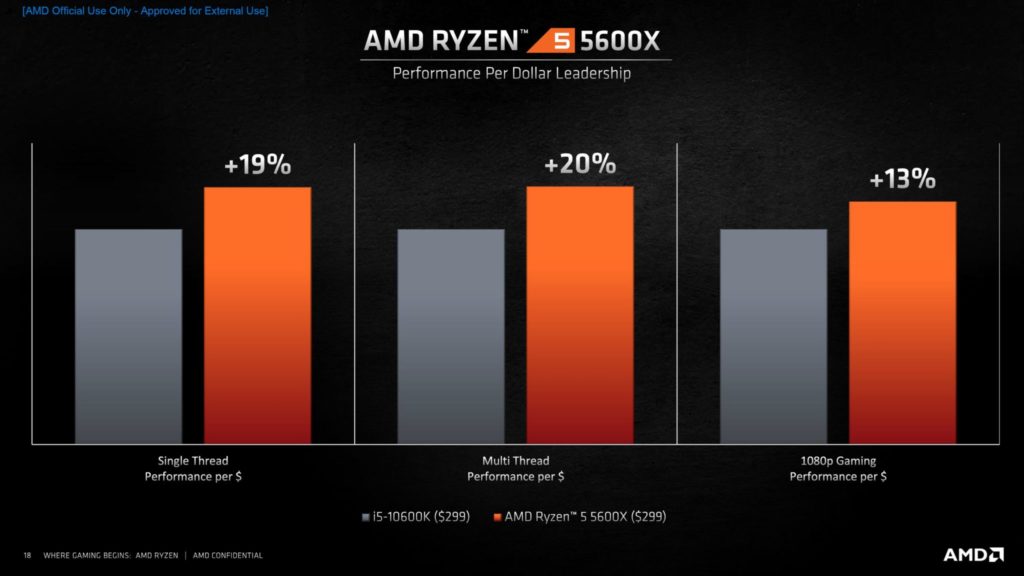
When you compare the 5600X to Intel’s 12th‑gen Core i5‑12400F, the Ryzen often edges ahead in gaming due to its higher boost clock, while the Intel chip may claim a slight advantage in multi‑threaded workloads thanks to its six performance cores plus four efficient cores. However, the 5600X’s lower power draw and broader motherboard compatibility often tip the scales for budget‑oriented builders.
Practical Build Recommendations
- Gaming‑focused:** Pair with a mid‑range GPU (RTX 3060 Ti / Radeon 6700 XT), 16 GB DDR4‑3200 RAM, and a B550 board.
- Streaming/Creation:** Upgrade to 32 GB RAM, add a fast NVMe SSD, and consider a higher‑end cooler for stable 4.8 GHz overclock.
- Compact/Quiet PC:** Use a mini‑ITX B550 board, a low‑profile air cooler, and a 550 W 80+ Gold PSU.
Common Pitfalls and How to Avoid Them
Many newcomers assume the 5600X can replace a high‑end eight‑core CPU for everything. In reality, heavy multitasking or large‑scale rendering will feel the difference. Another mistake is neglecting BIOS updates; an outdated firmware can limit memory compatibility or cause stability issues. Finally, pushing the voltage too high in pursuit of a marginal clock gain can shorten the CPU’s lifespan—stick to modest voltage targets and monitor temperatures.
Frequently Asked Questions
Is the Ryzen 5 5600X still a good choice for new builds in 2026?
Yes, especially if you’re targeting 1080p or 1440p gaming and want a balance of performance, power efficiency, and price. It holds its own against many newer mid‑range CPUs, provided you pair it with a compatible motherboard and adequate cooling.
Can I run DDR5 memory with the 5600X?
No. The 5600X is limited to DDR4; DDR5 support arrived with AMD’s AM5 platform, which uses the newer Ryzen 7000 series.
How much overclock can I realistically achieve?
Most silicon samples reach a stable 4.8 GHz on all cores with a modest voltage increase. Pushing beyond 5.0 GHz is possible but requires premium cooling and careful voltage management, and the performance gain becomes diminishing.
Do I need a high‑end cooler for everyday use?
Not necessarily. A quality mid‑range air cooler keeps the 5600X well within safe temperature limits during typical workloads. An AIO liquid cooler is only advisable if you plan to overclock aggressively or want an ultra‑quiet build.