How to Master Rising‑Edge Detection in TIA Portal
When you need a PLC to react the instant a signal goes from low to high, rising‑edge detection is the tool of choice. In Siemens’ TIA Portal this capability is built right into the ladder logic editor, but many newcomers stumble over the exact steps to set it up reliably. This practical guide walks you through the concept, the configuration, and a few troubleshooting tricks, so you can start using rising edges without guessing.
What “Rising Edge” Really Means
In digital terms a “rising edge” is the transition of a Boolean variable from 0 (false) to 1 (true). It’s different from a level‑based trigger, which stays active as long as the input remains high. Rising‑edge detection therefore fires only once per transition, making it perfect for counting pulses, starting timers, or toggling a motor on a single button press.
Creating a Rising‑Edge Block in TIA Portal
1. Open the PLC program in the TIA Portal project tree and navigate to the Program Blocks where you want the detection.
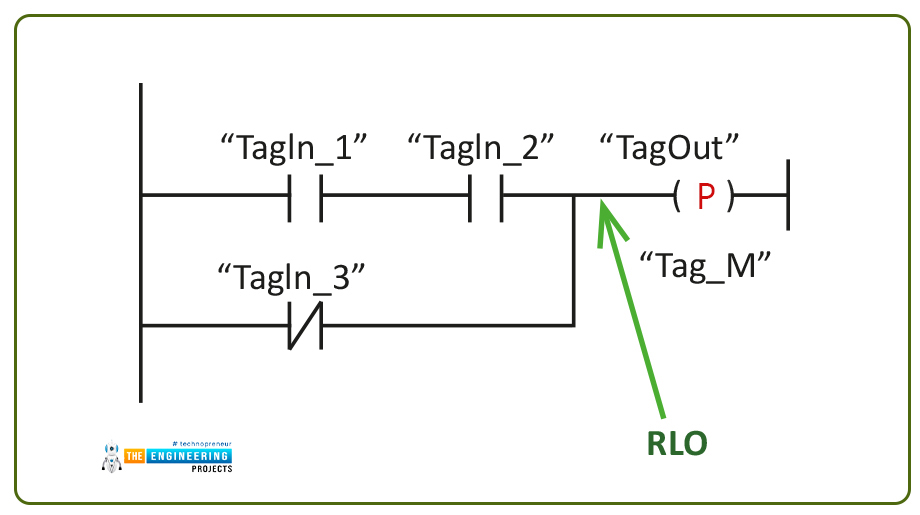
2. Drag a Rising Edge (R\_EDGE) instruction from the Instructions pane onto your ladder rung.
3. Connect the input variable – typically a digital input like I0.0 – to the IN pin of the block.
4. The Q output becomes true for exactly one PLC scan cycle whenever the input makes that low‑to‑high transition.
Remember to assign a meaningful name to the output (e.g., StartPulse) so the rest of your logic stays readable.
Why a Single Scan Cycle Matters
The Q output’s one‑scan‑cycle pulse means any downstream timer or counter will see only one activation per edge. If you accidentally use a level‑based contact instead, the timer could keep restarting, leading to erratic behavior. To avoid this, always test the Q output with a one‑shot or a short‑duration timer if you need a longer activation window.
Common Pitfalls and How to Avoid Them
- Missing the first edge after a power‑on. When the PLC starts, the input may already be high, causing the first rising edge to be skipped. A quick
R_TRIGreset or an initial scan check can capture that state. - Signal bounce on mechanical switches. Without debouncing, a noisy contact can generate multiple false edges. Use a hardware filter (RC network) or a software
DEBOUNCEblock before theR_EDGEinstruction. - Scanning speed vs. edge duration. If the input pulse is shorter than the PLC’s scan time, the edge may be missed entirely. In such cases, consider a high‑speed counter (HSC) module that samples inputs at a much higher rate.
Practical Example: Counting Production Parts
Imagine a conveyor with an optical sensor that pulses each time a part passes. You want to keep a running total without counting the same part twice.
1. Insert an R_EDGE block with the sensor input (I0.1) as IN.
2. Feed the Q output into a CTU (count up) counter block.
3. Display the counter’s CV (current value) on an HMI to show the part count.
Because the counter increments only on the rising edge, each part adds exactly one to the total, regardless of how long the sensor stays triggered.
Tips for Reliable Edge Detection
- Use descriptive variable names – e.g.,
Sensor_RisingEdge– to keep the code self‑documenting. - Group all edge‑related logic in a dedicated sub‑routine; this isolates it from the rest of the program and simplifies debugging.
- When working with multiple edges (rising and falling), keep separate
R_EDGEandF_EDGEblocks to avoid cross‑talk. - Run a simulation in TIA Portal before downloading to hardware; the simulation highlights missed edges caused by scan time mismatches.
FAQ
Can I use rising‑edge detection with analog signals?
Not directly. First you need to convert the analog value to a Boolean condition (e.g., “temperature > 50 °C”) using a comparator block, then feed that Boolean into the R_EDGE instruction.
What’s the difference between R_EDGE and POSITIVE_EDGE?
In TIA Portal the two names refer to the same instruction; older versions used POSITIVE_EDGE while newer releases standardized on R_EDGE. Functionally, both detect a low‑to‑high transition.
How do I reset a counter that was incremented by a rising edge?
Place a separate reset coil (e.g., a button on the HMI) that writes a 0 to the counter’s RES input. This action is independent of the edge detection, so the counter can be cleared at any time without affecting ongoing edge captures.
Is a rising‑edge block necessary for a simple start/stop motor circuit?
If the start button is a momentary push‑button, using a rising edge ensures the motor starts with a single press and stays on via a latch. Without it, the motor could start and stop repeatedly while the button remains pressed.