Unleash Your Voice Power with a Voice‑Activated Math Calculator
Why Voice Math Calculators Matter in the Modern Workflow
When the phone is on a call, the keyboard is a distant memory. Voice math calculators let you crunch numbers hands‑free, fitting perfectly into the multitasking rhythm of today’s professionals. From quick budgeting on a lunch break to complex engineering calculations while walking a dog, the ability to speak equations and receive instant feedback is a game changer.
How a Voice Math Calculator Works
- Speech Recognition – The software listens to your spoken input and converts it into text. Modern engines handle accents, background noise, and even slang like “plus” or “times.”
- Natural Language Parsing – The parsed text is translated into a mathematical expression. For example, “two point five multiplied by three minus eight” becomes (2.5 × 3) – 8.
- Execution Engine – Once the expression is formed, a standard arithmetic engine evaluates it, delivering the result instantly.
- Feedback Loop – The device reads the answer back aloud, confirms the calculation, and offers options like “repeat,” “add,” or “store.”
Top Use‑Case Scenarios
Every industry has moments where speed and safety matter. Below are scenarios where voice math shines:
- Students taking notes in class can solve algebra without leaving the lecture hall.
- Construction crews calculate material quantities while on the job site.
- Financial analysts quickly run “what‑if” scenarios during meetings.
- Gamers test score calculations on the fly without interrupting gameplay.
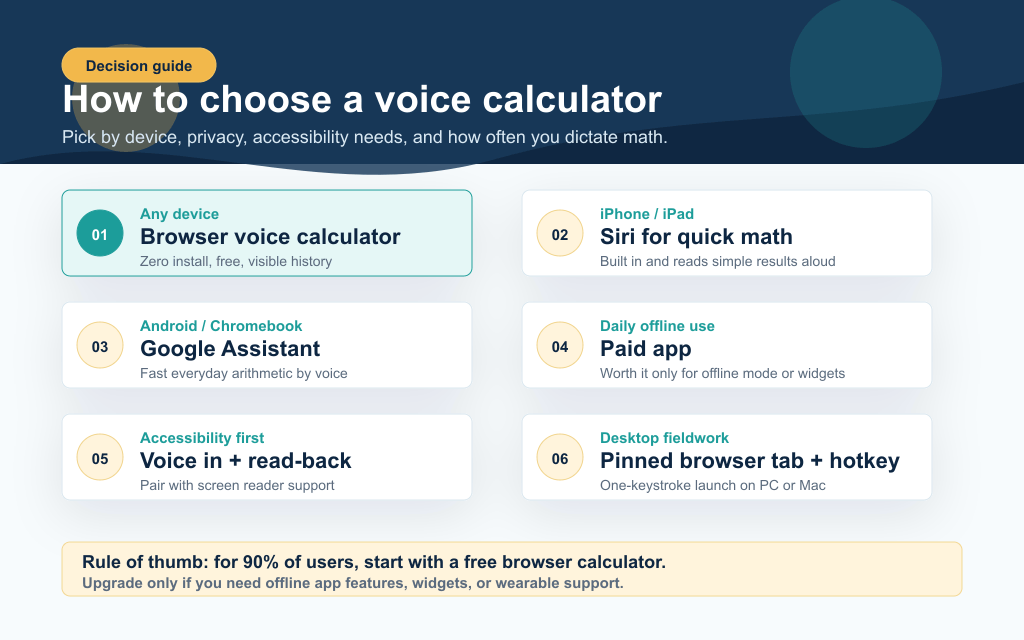
Choosing the Right Platform
When looking for a voice‑activated calculator, consider:
- Device Compatibility – Some apps run on iOS, Android, and even Windows PCs. Choose one that matches your existing ecosystem.
- Accuracy & Language Support – Look for engines that support multiple languages or dialects if you work in diverse teams.
- Privacy Settings – If you handle sensitive data, ensure the app offers on‑device processing or encryption.
- Customization Options – Features like custom commands or saving frequently used equations can boost productivity.
Getting Started in Minutes
Setting up a voice math calculator is as simple as turning on your smartphone’s assistant.
- Open the app and go to settings.
- Enable microphone access and choose your preferred language.
- Practice a few sample phrases: “What is 12 plus 7?” or “Subtract 9 from 45.”
- Explore advanced commands: “Integrate x squared from 0 to 2” or “Show me the steps.”
Most apps also offer a tutorial mode, so you’ll be comfortable speaking complex expressions in no time.
Overcoming Common Challenges
Even the best voice math tools can run into hiccups. Here are quick fixes:
- Misheard Words – If the device interprets “times” as “tomes,” pause and re‑speak with clearer enunciation.
- Accents and Slang – Update the language model or add custom vocabulary in the settings.
- Background Noise – Use a directional microphone or wear a noise‑cancelling headset.
- Complex Syntax – Break long equations into smaller parts: “First, 15 minus 4.” Then “Now multiply that result by 3.”
Future Trends: Beyond Simple Arithmetic
The frontier of voice‑activated math isn’t limited to addition or subtraction. Developers are integrating symbolic math, graphing, and even AI‑driven problem‑solving. Imagine a device that can not only calculate “what’s the derivative of x squared?” but also explain the steps verbally. As cloud computing grows, so too will the sophistication of these calculators.
Security and Privacy: What to Watch Out For
When your calculator is listening, data security matters. Choose apps that store data locally or encrypt transmissions. Keep an eye on permissions: unnecessary access to contacts or camera is a red flag. Regularly update your software to patch known vulnerabilities.
FAQs About Voice Math Calculators
Q1: Can I use a voice math calculator in noisy environments?
A1: Yes, many modern apps support noise‑canceling speech recognition, but using a headset can improve accuracy.
Q2: Does it support fractions and percentages?
A2: Most voice calculators understand “half,” “three quarters,” and “twenty percent” out of the box.
Q3: Are there keyboard alternatives for complex equations?
A3: Many apps allow you to switch between voice and on‑screen input for precision.
Q4: How secure is the data I speak?
A4: Reputable developers keep the data on-device or encrypt it in transit; always review privacy policies.


.jpg)