Mastering IPsec Security: The Ultimate Guide
What Exactly Is IPsec Security?
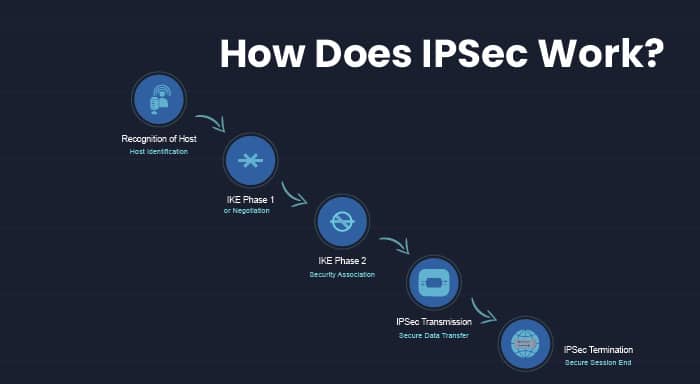
When you hear “IPsec security,” think of a set of protocols that encrypt and authenticate IP traffic right at the network layer. In practice, this means two computers—or whole sites—can exchange data over the public internet as if they were on a private LAN, shielded from eavesdroppers and tampering. The magic happens without changing your applications; the protection is baked into the IP packets themselves.
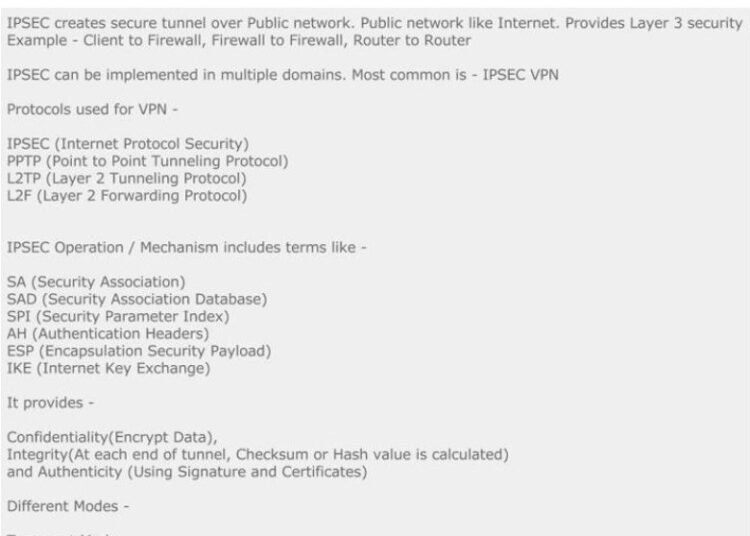
How IPsec Works: AH and ESP Explained
IPsec offers two core protocols, each with a distinct job:
- Authentication Header (AH) verifies that a packet truly comes from the claimed source and hasn’t been altered in transit. It adds a cryptographic checksum but doesn’t encrypt the payload.
- Encapsulating Security Payload (ESP) goes a step further, providing both authentication and confidentiality. ESP wraps the original IP packet in a new header, encrypting the payload so outsiders see only gibberish.
Most real‑world deployments favor ESP because it delivers both secrecy and integrity. AH is still useful in scenarios where encryption is prohibited but you still need tamper detection, such as certain government networks.
Key Modes: Transport vs. Tunnel
IPsec can operate in two modes, each suited to different topologies:
- Transport mode encrypts only the payload of the original IP packet, leaving the original header intact. It’s ideal for end‑to‑end protection between two hosts.
- Tunnel mode encapsulates the entire original IP packet inside a new IP header, then encrypts the whole thing. This is the go‑to choice for site‑to‑site VPNs, where gateways protect traffic flowing between entire networks.
Choosing the right mode hinges on where you place the IPsec endpoints and what you need to hide from the outside world.
Common Deployment Scenarios
Enterprises and small businesses alike rely on IPsec for a handful of tried‑and‑true use cases:
- Remote‑access VPNs: Employees connect from home or on the road, authenticating to a corporate gateway that wraps their traffic in ESP tunnel mode.
- Site‑to‑site VPNs: Two branch offices link their LANs over the internet, each using a firewall or router as the IPsec terminator.
- Hybrid cloud connections: Cloud providers often expose IPsec endpoints so on‑premises data centers can extend their private networks into the cloud.
- Secure inter‑datacenter links: High‑throughput routers employ hardware acceleration for IPsec to protect massive data flows without sacrificing performance.
Best Practices for Strengthening IPsec Security
Implementing IPsec is more than flipping a switch. Follow these guidelines to keep your tunnel robust:
- Use Strong Encryption Algorithms—AES‑256 is the current gold standard. Avoid legacy ciphers like DES or 3DES, which are vulnerable to modern attacks.
- Prefer Diffie‑Hellman Group 14 or Higher for key exchange, ensuring a 2048‑bit modulus. Lower groups can be cracked with enough computational power.
- Enable Perfect Forward Secrecy (PFS) so that compromising one session key doesn’t jeopardize past communications.
- Implement Mutual Authentication using X.509 certificates rather than pre‑shared keys (PSKs). Certificates scale better and reduce the risk of key reuse.
- Limit Traffic with ACLs on each gateway, allowing only the intended subnets to traverse the VPN. This reduces exposure if an attacker gains access to the tunnel.
- Keep Firmware Updated on routers, firewalls, and any device handling IPsec. Vendors regularly patch vulnerabilities that could otherwise be exploited.
- Monitor and Log all IPsec negotiations. Anomalous authentication failures often hint at a brute‑force attempt or misconfiguration.
Troubleshooting Common Issues
Even a well‑designed IPsec deployment can hit snags. Here are a few frequent pain points and how to address them:
- Phase‑1 Negotiation Failures: Verify that both ends share the same IKE version (v1 or v2) and that encryption, hash, and DH group settings match exactly.
- MTU and Fragmentation Problems: IPsec adds overhead, which can push packets over the maximum transmission unit. Adjust the MTU on interfaces or enable MSS clamping on the VPN gateway.
- Asymmetric Routing: If traffic destined for the remote network takes a different path back, packets may be dropped. Ensure routing tables on both sides point to the IPsec tunnel for the appropriate prefixes.
- Clock Skew: IKE relies on timestamps. Large discrepancies between device clocks can cause authentication errors. Use NTP to keep time synchronized.
- Certificate Revocation Checks: A revoked or expired certificate will abort the handshake. Double‑check the validity period and CRL/OCSP configuration.
Future‑Proofing Your IPsec Deployment
Network security evolves quickly. To keep your IPsec implementation relevant:
- Regularly audit cipher suites and phase‑2 proposals, retiring anything older than five years.
- Consider integrating IPsec with Software‑Defined WAN (SD‑WAN) solutions, which can automatically select the best path while preserving encryption.
- Stay aware of emerging standards like IKEv2‑EAP for stronger authentication methods, especially in mobile environments.
Frequently Asked Questions
Q: Can I run IPsec over IPv6?
A: Yes. IPsec was originally designed for IPv6, and most modern devices support both IPv4 and IPv6 tunnels with the same configuration principles.
Q: Is IPsec still secure against quantum computers?
A: Current implementations rely on algorithms (e.g., AES‑256, DH‑2048) that are not quantum‑proof. Organizations concerned about long‑term confidentiality should monitor NIST’s post‑quantum recommendations and consider hybrid approaches.
Q: How does IPsec differ from SSL/TLS VPNs?
A: SSL/TLS operates at the transport layer and typically secures individual applications (like a web browser). IPsec secures all IP traffic, making it a better fit for full‑network connectivity.
Q: Do I need a separate firewall rule for IPsec traffic?
A: Generally, you’ll allow UDP ports 500 and 4500 (for IKE and NAT‑Traversal) plus ESP (protocol 50) through the perimeter firewall. Fine‑tuning these rules to restrict source and destination IPs improves security.