How to Master Google’s Indexing API for Faster Crawling and SEO
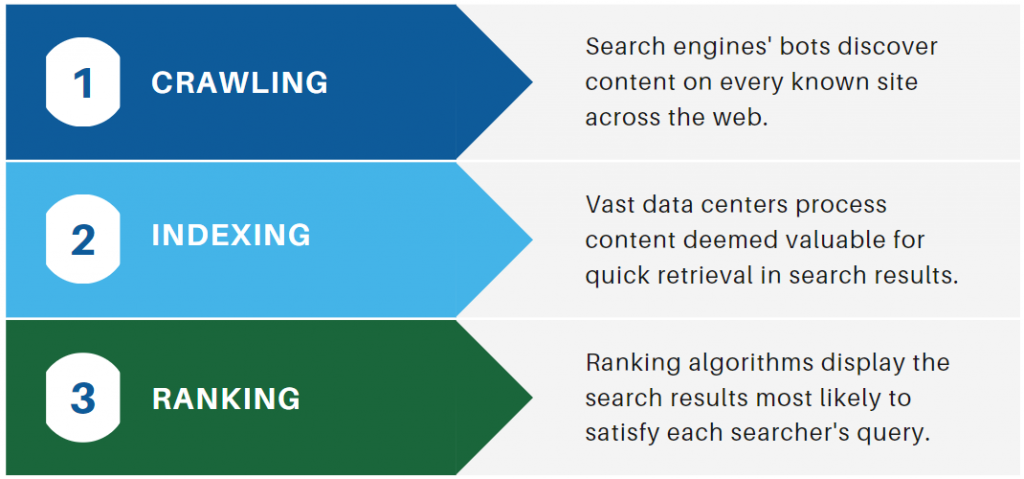
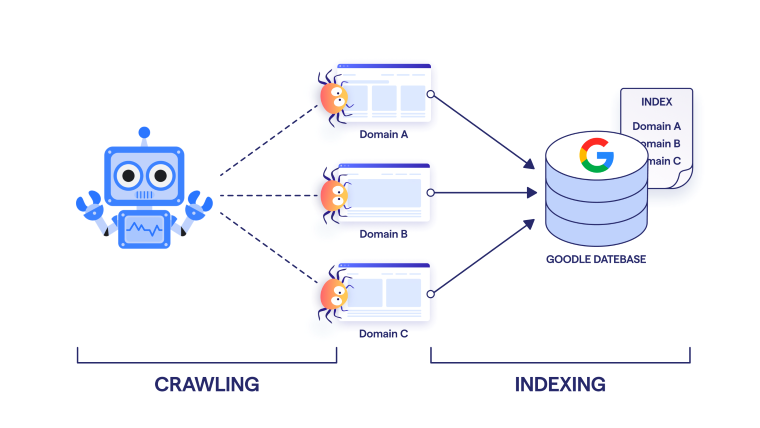
When new content lands on the web, the speed at which Google discovers and ranks it can make the difference between immediate traffic and languishing in the deep. Google’s Indexing API gives developers a direct line to that discovery process, letting you push updates, request re‑indexing, and monitor status in real time. In this guide we’ll walk through the core concepts, why speed matters, and how to set up the API for maximum crawling efficiency.
What Is the Indexing API?
The Indexing API is a RESTful interface that lets you submit URLs for rapid crawling and removal. Unlike the old “fetch as Google” tool in Search Console, the API operates programmatically, which means you can integrate it into your build pipelines, CMS updates, or e‑commerce platforms. The API is especially useful for high‑traffic sites, news outlets, or any publisher that frequently pushes new content.
Why Speed Matters in SEO
Search intent is increasingly time‑sensitive. Users expect news articles, product pages, or event listings to appear in results almost immediately after publication. A delay of even a few hours can cost impressions and, eventually, conversions. Faster indexing also improves the accuracy of freshness signals that Google uses in rankings, especially for categories that reward recency.
Freshness vs. Authority
Google’s algorithms weigh two main signals when ranking content: authority (how trusted a site is) and freshness (how current the page is). While authority builds over time, freshness can give a temporary boost to new pages if the crawler reaches them quickly. The Indexing API ensures that fresh content is indexed before competitors even publish it.
Getting Started with the API
- Create a Google Cloud project and enable the Indexing API in the console.
- Set up OAuth 2.0 credentials – use a service account with a JSON key file for server‑to‑server authentication.
- Install the client library for your preferred language (Python, Node.js, Java, etc.).
- Test a basic submission by posting a small JSON payload that includes the URL and the type of content (“URL” for a standard page, “URL_REMOVAL” to delete).
Below is a concise Python snippet that demonstrates a typical submission:
import google.oauth2.service_accountfrom googleapiclient.discovery import build
SCOPES = ['https://www.googleapis.com/auth/indexing']
KEY_FILE = 'service-account.json'
credentials = google.oauth2.service_account.Credentials.from_service_account_file(
KEY_FILE, scopes=SCOPES)
service = build('indexing', 'v3', credentials=credentials)
request_body = {
'url': 'https://example.com/new-article',
'type': 'URL'
}
response = service.urlNotifications().publish(body=request_body).execute()
print(response)
When the API returns a jobId, you can poll for status or rely on the callback URL you set up for asynchronous notifications.
Configuring Fast Crawling
Submitting URLs is only part of the equation. Google still needs to fetch the page, render JavaScript, and parse content. Here are strategies to reduce crawl latency:
- Optimize server response times – keep TTFB under 200 ms for key landing pages.
- Serve compressed content (gzip or Brotli) to lower transfer size.
- Use a Content Delivery Network (CDN) to deliver assets from edge locations close to users.
- Minimize redirects – each hop adds delay and may cause the crawler to hit a different origin.
- Prioritize critical CSS and JavaScript so that the crawler can render the DOM without blocking.
- Set appropriate
robots.txtrules to ensure the crawler can access all necessary resources, especially theindexingAPI’s callback endpoint.
Asynchronous Notifications
Google can send a webhook to your server whenever the status of a submitted URL changes. By configuring a callback URL in the API console, you receive immediate updates instead of polling. This real‑time feedback loop lets you react quickly—e.g., trigger a second crawl if the initial attempt fails.
Best Practices for a Healthy Submission Workflow
While the API is powerful, misuse can lead to throttling or even account suspension. Follow these guidelines to stay within Google’s acceptable use policy:
- Batch submissions – Google recommends sending no more than 50 URLs per second. Use exponential backoff if you hit limits.
- Avoid duplicate notifications – only submit when the page content changes.
- Monitor job failures – if Google rejects a URL, review the error message and adjust the payload.
- Use
URL_REMOVALsparingly – removal requests can be expensive and may trigger a higher crawl cost.
Common Pitfalls and How to Avoid Them
- Submissions for low‑value URLs – pages with thin content or heavy duplicate text can be ignored by the crawler. Focus on unique, high‑quality content.
- Ignoring canonical tags – if you submit multiple URLs that canonicalize to the same page, Google may merge them, wasting crawl budget.
- Over‑reliance on the API – use it for critical updates, but still maintain regular sitemaps and proper internal linking so the crawler discovers content organically.
- Failing to validate SSL – Google will reject URLs that don’t have a valid HTTPS certificate, so keep your SSL up to date.
Tools & Resources to Keep Your Indexing Workflow Smooth
- Google Search Console – cross‑check API submissions with the “URL Inspection” tool.
- Webmaster Tools – use the “Coverage” report to spot crawl errors related to API submissions.
- Cloud Monitoring – set alerts for repeated job failures or high latency.
- Developer documentation – always refer to Google’s official API reference for the latest changes.
FAQ
- Can I use the Indexing API for all content types? Yes, but it’s most beneficial for pages that change frequently, such as news articles, product listings, or time‑sensitive updates.
- What if my API calls are throttled? Implement exponential backoff and reduce submission frequency.
- Is there a cost associated with the Indexing API? There is no direct charge, but you pay for the Google Cloud project usage and any network traffic.
![Crawling & Indexing: Google Index Explained Simply [2026]](https://www.seo-kreativ.de/wp-content/uploads/2026/01/crawling-and-indexing-how-google-finds-your-website-1024x572.jpg)