Aigo PC Cases – The Complete Guide for Smart Buyers
When you start building a custom PC, the case is the first canvas you’ll see. It’s more than a box; it sets the tone for airflow, aesthetics, and even future upgrades. Aigo has been quietly carving out a niche with cases that promise solid build quality without the premium price tag. This guide walks you through everything you need to know about Aigo PC Cases, from design quirks to choosing the right size for your build.
Aigo PC Cases: Why They Stand Out
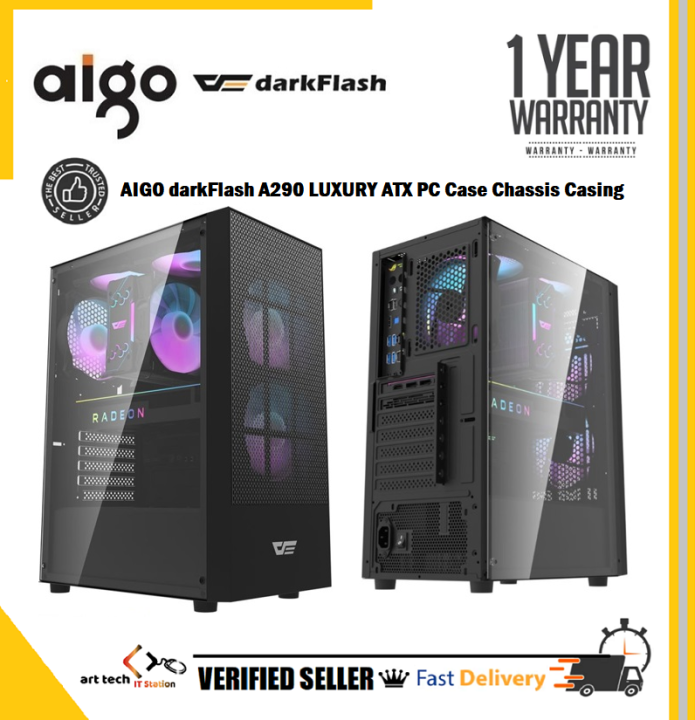
At a glance, Aigo cases blend minimalist styling with practical features. Unlike some budget brands that cut corners on material, Aigo typically uses steel frames and tempered glass panels, giving the chassis a sturdy feel. The brand also offers a decent range of front‑panel USB‑C ports, cable‑management hooks, and tool‑less drive bays, which are often reserved for higher‑priced competitors. For hobbyists who want a clean look without overspending, that combination can be a real draw.
Design Philosophy and Build Quality
Most Aigo models follow a straightforward, modular design. The front panel usually slides open, revealing the interior without requiring extra screws. Inside, you’ll find a mesh or perforated section that encourages natural airflow, especially in the mid‑tower variants. The tempered glass side panels are typically 5 mm thick—thin enough to keep the weight manageable but thick enough to resist cracking under normal handling.
- Materials: Steel chassis with powder‑coated finish for rust resistance.
- Glass: Tempered, anti‑glare, often with a brushed or tinted finish.
- Ventilation: Front and top mesh filters that are removable for cleaning.
These choices suggest Aigo is aiming for durability and a sleek visual profile rather than gimmicks.
Size Options and Compatibility
Aigo’s lineup covers the usual spectrum: compact micro‑ATX, standard mid‑tower, and even a few full‑tower offerings. The micro‑ATX models are perfect if you’re tight on desk space, but they still accommodate full‑size graphics cards up to 320 mm. Mid‑towers, the most common choice, usually support ATX motherboards, up to 360 mm GPU lengths, and multiple storage drives (typically two 3.5″ bays and four 2.5″ slots). Full‑tower options open up space for dual‑system builds or extensive liquid‑cooling loops.
When matching a case to your components, double‑check the GPU and CPU‑cooler clearances listed in the specifications. Aigo often provides a bit more breathing room than the spec sheet suggests, but it’s wise to measure your hardware before ordering.
Cooling Solutions and Airflow
Effective cooling is a make‑or‑break factor for any PC, and Aigo cases don’t disappoint. Most models support at least three 120 mm fans out of the box—two at the front and one at the rear. The front intake usually comes with pre‑installed fans, while the rear exhaust is either pre‑mounted or ready for a quick snap‑in.
If you plan to run an AIO liquid cooler, look for a case with a top‑mount radiator space. Aigo’s mid‑towers often accept up to a 240 mm radiator on the top and a 280 mm on the front, giving you flexibility for overclocking or silent builds. The mesh panels also reduce dust buildup compared to solid steel fronts, though regular cleaning is still advisable.
Pricing and Value Proposition
In the current market, a decent mid‑tower case from a mainstream brand can range from $70 to $150. Aigo positions its products near the lower end of that spectrum, typically $65‑$110, depending on size and features. While you won’t get the premium lighting ecosystems of brands like Lian Li, you do receive a solid steel frame, tempered glass, and functional front‑panel ports—all of which add up to respectable value.
That said, some users report occasional paint chips on the lower edges after a few months of heavy use. It’s a minor cosmetic flaw that doesn’t affect structural integrity, but it’s worth noting if you’re particular about pristine aesthetics.
How to Pick the Right Aigo Model
Choosing the right case boils down to three questions:
- What form factor does your motherboard use?
- How much cooling headroom do you need?
- Do you prioritize aesthetics (glass) over maximum internal space?
If you’re building a compact gaming rig, the Aigo M1 micro‑ATX is a solid pick—it offers a tempered glass side panel and a built‑in front fan while staying under 200 mm in height. For a balanced build with room for a 280 mm AIO and a few SSDs, the Aigo T2 mid‑tower provides the necessary expansion slots and a clean interior layout. Finally, if you’re eyeing a dual‑system or a massive liquid‑cooling loop, the Aigo X3 full‑tower delivers the extra clearance and modular drive cages.
Installation Tips and Common Pitfalls
Even a well‑designed case can trip you up if you’re not careful during the build. Here are a few practical pointers:
- Plan cable routes early. Aigo cases include rubber grommets and Velcro straps, but the best results come from routing power and data cables behind the motherboard tray before installing the GPU.
- Mind the front‑panel connectors. The USB‑C ports are often mounted on a small PCB that can be accidentally dislodged if you force the front panel too hard.
- Secure the tempered glass. When snapping the side panel into place, apply even pressure on both corners to avoid stressing the glass edges.
- Check fan orientation. Front fans should pull air in, rear fans should push it out. Aigo’s fan clips are color‑coded, which helps avoid mix‑ups.
Following these steps usually results in a smooth build experience, even for first‑time builders.
Frequently Asked Questions
Do Aigo PC Cases support liquid‑cooling radiators?
Yes. Most mid‑tower models accommodate up to a 240 mm radiator on the top and a 280 mm radiator on the front. Full‑tower options can handle even larger configurations, making them suitable for custom loops.
Are the tempered glass panels prone to cracking?
While tempered glass is designed to be robust, it can crack if subjected to strong impacts. In normal use—opening and closing the side panel—Aigo’s glass panels hold up well. Just avoid dropping heavy tools onto the panel.
How does Aigo’s warranty compare to other brands?
Aigo typically offers a one‑year limited warranty covering defects in materials and workmanship. This is comparable to many mid‑range case manufacturers, though some premium brands extend coverage to two or three years.
Can I replace the front mesh filter without tools?
Yes. Aigo designs its front filters to slide out and snap back in, so you can clean them with a vacuum or a soft brush without needing any screwdrivers.